
The device has three full-sized USB 2.0 ports, which become four once we had the provided USB OTG adapter to the remaining micro USB port. So I’ve connected a USB 3.0 hard drive, the RF dongle for NEO A2 Lite air mouse, a USB hub with a USB webcam, a USB keyboard, and the RF dongle for Tronsmart Mars G01 gamepad, as well as USB powered speakers to the micro USB port. After inserting HDMI, optical audio and Ethernet cables, as well as the speakers cable into the 3.5mm speaker jack, I connected the 5V/3A power supply, and… nothing happened. So you just need to press the power button on the remote or unit itself to boot the device. A boot typically takes just over 30 seconds, or quite faster than the 50 seconds or so on lower end Amlogic S905 devices such asK1 Plus or Beelink MINI MX.
Click for Original Size
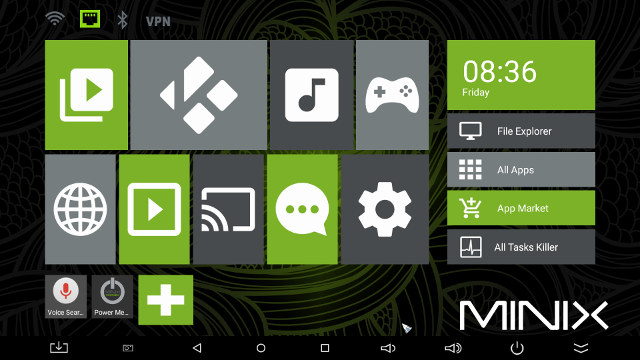
That’s the typical MINIX launcher, but an improvement over MINIX NEO X8-H Plus home screen when it launched last year. The top 4 icons shows WiFi, Ethernet, Bluetooth and VPN status. The first 8 icons in the center are “folders” for apps categorized in Videos, Kodi, Music, Games, Internet, Online streaming. Screencasting, and Social, with the last one redirecting to Amlogic settings app, as seen on all other Android Lollipop firmware for Amlogic TV boxes. The bottom row is for shortcuts, and the right column features time/data, a File Explorer apps folder, the full list of app (confusingly sorted in Chronological order), and App Market apps folder, and All Tasks Killer to automatically kill all background tasks. The status provided a convenient link to the Download folder, as well as the usual other buttons Home, Back, Volume, etc… You can hide the bar with the double down arrow icon on the right, and make it show again by pulling it up from the bottom.
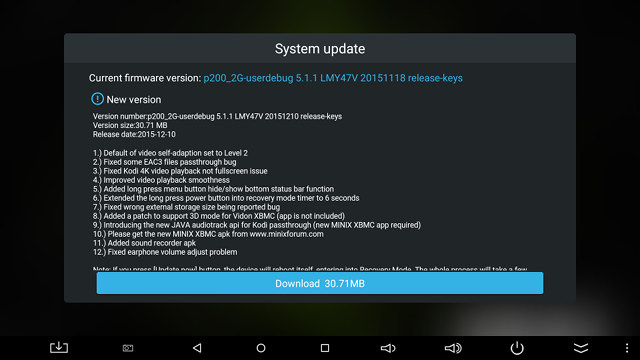
Before going to the settings, I’ll mention my experience with FOTA (Firmware Over The Air) update. MINIX asked me to delay the review until their release FW003 firmware and XBMC for MINIX, which was out Friday evening. So I went to MINIX System Update app, and the new firmware was properly detected.
Click for Original Size
I liked that the update comes with a full log, and that it was a small incremental 30.71 MB download. The process went very smooth, with the device rebooted after unpacking the firmware, and flashing it with the usual Android firmware update animation. I would have however preferred that XBMC for MINIX was included inside that firmware, instead of asking users to side-loadMINIX_XBMC_20151209.apk themselves.
Click to Enlarge
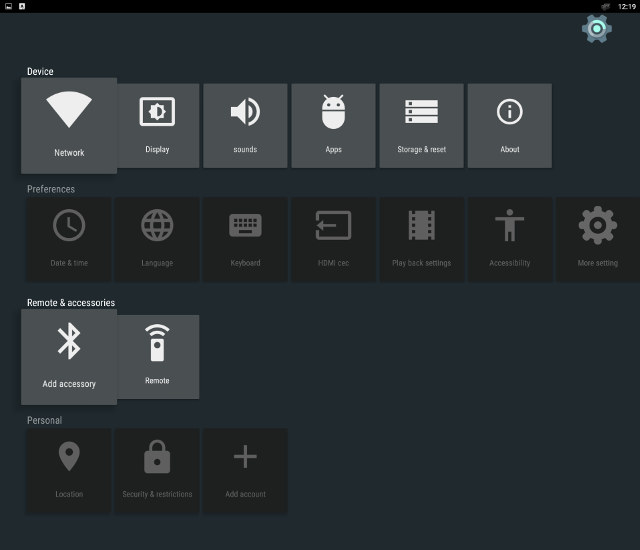
The main options in the settings app are exactly the same as in MINI MX, as shown above, however the company also made some improvement (in bold) to the most important options:
- Network – WiFi, Ethernet, and VPN configuration
- Display
- Screen resolution: Auto, 480p-60Hz, 576p-50Hz, 720p 50/60Hz, 1080i 50/60Hz, 1080p 24/50/60Hz, 4K2K 24/25/30/50/60Hz or SMPTE
- Screen position
- Screen rotation (middle port, force land, original)
- Sound – System sound (On/Off), Digital sounds (Auto detection, PCM, HDMI or SPDIF), and USB audio
- Preferences – HDMI CEC (But not working: “This remote device does not support CEC”), and Play back settings with “HDMI self-adaption” with three options:
- OFF – no processing
- Level 1 – 23.976fps videos are processed under 1080p60Hz mode;
- Level 2 – Switching TV’s output according to source video fps
- Remote & accessories – Add Bluetooth devices (redirect to Android lollipop Bluetooth configuration)
As with other Amlogic devices, configuring the network options (WiFi, Ethernet and Bluetooth) went well. I could set video output to 4k2k @ 60Hz, but sometimes the video output would fall back to 1080i50 or 2160p25. The former happened once or twice after a reboot, or power cycle, and is easily noticeable, as the mouse pointer will be much bigger. I think the latter (2160p25) happened after playing some videos (TBC).
You can go to Android Lollipop settings by clicking on More Settings. I could immediately a new feature that stands out: MCU setting.
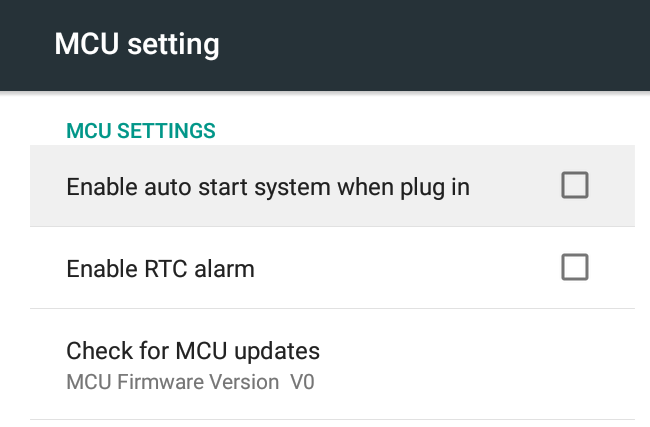
 You can configure the MCU behavior in this section. For example, you can select to automatically start the device when power is on, instead of having to press the power button. I’ve not sure what “RTC alarm” means in that context, maybe “low battery”?, but if the MCU is also handling RTC some neat feature like timed power on/off could also be implemented in the future. Finally, I could upgrade the MCU firmware to Version V1 without issues.
You can configure the MCU behavior in this section. For example, you can select to automatically start the device when power is on, instead of having to press the power button. I’ve not sure what “RTC alarm” means in that context, maybe “low battery”?, but if the MCU is also handling RTC some neat feature like timed power on/off could also be implemented in the future. Finally, I could upgrade the MCU firmware to Version V1 without issues.
The 16GB eMMC flash is partitioned with a single unified 11.87GB partition, which is plenty of space for apps, and some data, and at the end of the review I still had 7.57GB free space. All options that you can find in Android Lollipop are also there including Language & Input, Backup & reset, Printing, Accessibility, and so o.
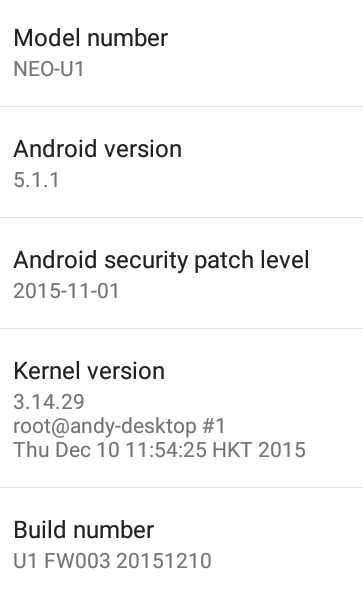
The “About Mediabox” section reports NEO-U1 model number running Android 5.1.1 on top of Linux kernel 3.14.29, with the firmware firmware version being U1 FW003 20151210. The firmware is not rooted by default.
A MINIX infrared remote control is included by default. I added two AAA batteries, and I could use it without problem, even up to 10 meters. But I strongly recommend you also purchased MINIX NEO A2 Lite air mouse as well, especially if you don’t already a wireless keyboard or air mouse with keyboard, as it makes the user experience much better with a three-in-one keyboard, air mouse, and remote control. The mouse pointer works just as well as in MeLE F10 Deluxe, but the dedicated air mouse activation key removed unwanted clicks I sometimes get with the MeLE device when I want to enable air mouse mode. The keyboard is also nice with large keys, and the range is also very good, as I could test it up to 10 meters. I only found some “minor” issues. I found myself pressing the top button of the D-pad quite often instead of the OK button, so the design might have been slightly more ergonomic if the D-Pad was slightly higher. That one probably depends on your hand size though. While the keyboard is really nice, I wished the often used Space and Back key where left alone as in a full keyboard, as when Fn is enabled, pressing space will display the equal sign “=” instead, and the Back key will feel like it’s not used as all since it’s in “Delete mode”. But as I said these are minor, and possibly just something to get used to. Another input option is to use the Android remote control app for MINIX NEO U1 with your smrtphone.
The Google Play Store worked for all apps I had to use for the review, and most apps I previously installed on my phone would also install, except when telephony is required, or an app can now be only installed in specific countries. I also installed Amazon Underground, in order to play Riptide GP2 for free.
Power handling is very well implemented, and you can go into standby or power off the device with the remote control, or the power button. MINIX NEO H8-Plus would not support turning on the device with the remote control, which was a pain, the company fixed that with NEO U1 and you can comfortably control the system from your sofa using either the included IR remote or NEO A2 Lite air mouse.
Power consumption is also good, and the hard drive is properly turned off in standby or power off modes:
- Power off – 0.1 Watt
- Standby – 1.2 Watt
- Idle – 3.2 to 3.4 Watts
- Power off + USB HDD – 0.1 Watt
- Standby + USB HDD – 1.4 Watt
- Idle + USB HDD – 4.3~4.4 Watts
So you’ll actually spend a little less money compared to cheaper Amlogic alternatives when the box is in power off or standby mode. I did come across two issues:
- Once I got stuck in standby mode, which required a power cycle
- When I disconnected the USB hub, all other USB ports went down… so the hard drive, and A2 Lite air mouse would not work… That was a little scary, but I used the IR remote control to turn off and on the device again, and it worked.
Amlogic S905 processor is already low power, and just like Beelink MINI MX, NEO U1 stays cool during operating. I measured 41°C and 45°C respectively on the top and bottom of the case after Antutu 6.0, and the temperature went up slightly after playing Riptide GP2 for 20 minutes to 45°C and 50°C. Those are values measured with an IR thermometer, and I scanned both top and bottom covers of the case to find the highest temperature.
Overall, the firmware is very and extremely responsive, as I never had slowdown during use, so the user experience is very good with this device, and much different from the cheaper Amlogic S905 devices. As seen above there are still some small bugs, which hopefully they’ll be worked on in due time.
Read more: http://www.cnx-software.com/2015/12/14/review-of-minix-neo-u1-media-hub/#ixzz4DjGfORfb